
How Does a Portable Receipt Printer Support Mobile Sales?
2026-10-27
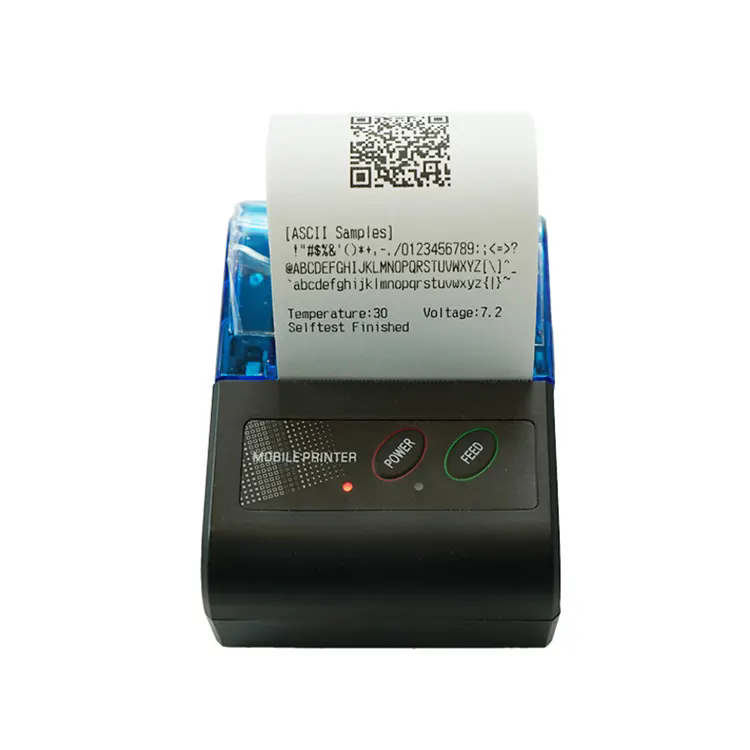
A vendor at a weekend market completes a sale on a tablet, taps a button, and a receipt prints from a device clipped to her belt. The customer takes the receipt, and the vendor moves to the next customer without leaving the stall. This workflow is only possible because the Thermal Receipt Printer is portable, battery powered, and connected wirelessly to the sales app. Without it, the vendor would have to write receipts by hand or walk to a fixed printer at the back of the stall. This guide explains how portable receipt printers support mobile sales and what to verify before deploying them in the field.
1. Why Does Battery Runtime Determine How Many Sales a Mobile Vendor Can Complete in a Day?
A mobile sales operation runs on a schedule. The vendor arrives at the location, sets up, and sells for a fixed number of hours. If the Thermal Receipt Printer battery runs out before the end of the day, the vendor cannot issue receipts, and some customers will not complete the purchase. The battery runtime depends on the print duty cycle, the print density, the paper width, and the battery capacity. A typical 58 mm portable printer with a 2,000 mAh battery can print 200 to 300 receipts on a single charge, depending on the content. The table below shows the runtime for different daily receipt volumes and paper widths.
| Paper width | Receipt length | Receipts per charge | Typical daily volume |
| 58 mm | 80 mm | 250 – 300 | 150 – 250 |
| 58 mm | 150 mm | 150 – 200 | 100 – 150 |
| 80 mm | 100 mm | 180 – 220 | 120 – 180 |
| 80 mm | 200 mm | 100 – 140 | 80 – 120 |
In our factory, we test the battery runtime of every Thermal Receipt Printer model under a standard duty cycle. The test measures the number of receipts printed before the battery reaches the low-voltage cutoff. The result is provided in the product datasheet so that the buyer can match the printer to the expected daily volume. Xiamen Peite Electronic Technology Co., Ltd. has been manufacturing portable receipt printers for over 10 years.
The runtime can be extended by using a lower print density, by using a smaller paper width, or by carrying a spare battery. Many of our models support battery hot-swap, which allows the vendor to replace the battery without turning off the printer.
2. How Does Wireless Pairing Simplify Setup and Reduce Downtime at the Point of Sale?
A portable printer must connect to the sales device without cables. The most common connection methods are Bluetooth Classic, Bluetooth Low Energy, and Wi-Fi. Bluetooth Classic is the most widely supported by Android and iOS sales apps. Bluetooth Low Energy reduces power consumption but has lower data throughput, which can slow the print speed for long receipts. Wi-Fi is used when the printer must be shared by multiple devices or when the sales app runs on a device without Bluetooth. The table below compares the connection methods.
| Connection method | Typical range | Power consumption | Best use case |
| Bluetooth Classic | 10 – 30 m | Moderate | Single device, high print volume |
| Bluetooth Low Energy | 10 – 30 m | Low | Single device, low print volume |
| Wi-Fi | 30 – 50 m | High | Multiple devices, fixed stall |
| USB | Cable length | Low | Backup connection, charging |
Field operations note: Bluetooth Classic is the most reliable choice for mobile sales because it is supported by almost every sales app and it handles long receipts without buffering delays. The pairing process should be simple: turn on the printer, open the app, select the printer from the list, and confirm. A printer that requires a PIN code or a manual configuration file will slow down the setup at each new location. In our factory, we pre-configure the printer name and the pairing mode so that the vendor can connect in under 30 seconds. Xiamen Peite Electronic Technology Co., Ltd. provides a setup guide with each model.
3. What Paper Handling Features Keep a Mobile Printer Running Between Customers?
The paper handling system determines how quickly the vendor can change a paper roll and how reliably the printer feeds the paper without jamming. A mobile Thermal Receipt Printer should have a drop-in paper loading mechanism that does not require threading the paper through a slot. The paper roll should be held in a compartment that prevents it from unspooling when the printer is carried. The print head should have a tear bar that allows the vendor to tear the receipt cleanly without pulling the paper out of alignment. In our factory, we design the paper compartment with a spring-loaded lid and a roll retainer. The tear bar is made from hardened steel and is positioned at the correct angle for a clean tear. Xiamen Peite Electronic Technology Co., Ltd. tests the paper feed mechanism for 50,000 cuts without a jam.
The paper specification also matters. A portable printer should use a thermal paper with a smooth surface and a consistent coating. A low-grade paper can leave residue on the print head and reduce the print quality over time. We recommend a 58 mm or 80 mm thermal paper with a basis weight of 55 to 65 grams per square meter.
4. Why Does Drop and Dust Protection Matter for Printers Used in Outdoor Markets and Delivery?
A portable printer used in mobile sales is exposed to handling that a fixed printer never sees. It is clipped to a belt, placed on a table, carried in a bag, and sometimes dropped. It is also exposed to dust, sand, and light rain. The enclosure must protect the internal mechanism from these conditions. The protection level is expressed by the IP rating. An IP54 rating means the enclosure is protected against dust ingress and against water splashes from any direction. A drop rating of 1.5 meters means the printer can survive a drop onto a hard surface without losing function. In our factory, we design the enclosure with a rubberized bumper and a sealed paper compartment. We test the drop performance on a concrete floor and the dust protection in a sand chamber. Xiamen Peite Electronic Technology Co., Ltd. provides the IP rating and the drop rating in the product datasheet.
We also recommend that the printer be carried in a protective case when it is not in use. The case should have a belt clip and a clear window for the paper roll. This extends the service life and reduces the risk of damage during transport.
5. How Should a Mobile Sales Operator Specify and Verify a Portable Receipt Printer?
The specification should include the paper width, the print speed, the battery capacity, the connection method, the IP rating, the drop rating, and the operating temperature range. The verification should include three tests. The first is a full-day runtime test with the expected receipt volume. The second is a pairing test with the sales app that will be used in the field. The third is a drop test from the height of the vendor's belt onto a hard surface. In our factory, we perform these tests on a sample basis and provide the test report with the shipment. Xiamen Peite Electronic Technology Co., Ltd. also offers a field trial program so that the operator can test the printer in the actual sales environment before committing to a full order.
We recommend that the operator check the printer's firmware compatibility with the sales app. Some apps require a specific command set or a specific character encoding. A printer that is not compatible with the app will print garbled text or will not print at all. Our technical team can confirm the compatibility before the order is placed.
Frequently Asked Questions About Portable Receipt Printers for Mobile Sales
Summary for Mobile Sales Operators and Field Teams
A portable Thermal Receipt Printer supports mobile sales by providing on-the-spot receipts without a fixed counter. The key specifications are battery runtime, wireless pairing, paper handling, and drop and dust protection. The battery should match the daily receipt volume. The connection should be compatible with the sales app. The paper handling should allow quick roll changes. The enclosure should survive the handling of a mobile environment. Xiamen Peite Electronic Technology Co., Ltd. has been manufacturing portable receipt printers for over 10 years and provides full field trial and compatibility support for mobile sales operators.